3D Layout Chicken Coop Model Laser Cut
There is a distinct satisfaction in watching raw wood transform into a structured, three-dimensional object. For makers, hobbyists, and small business owners looking to expand their product lines, the 3D Layout Chicken Coop Model Laser Cut file offers more than just a digital template; it provides a blueprint for tangible creativity. Whether you are running a high-speed CO2 laser cutter or a diode setup, this design bridges the gap between digital precision and physical craftsmanship. It captures the rustic charm of farm life while adhering to modern manufacturing standards, making it an ideal project for those who appreciate both aesthetics and engineering.
The Visual Appeal and Structural Design
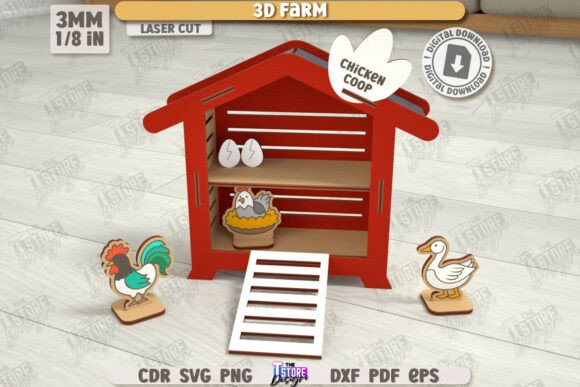
The personality of this model lies in its clean lines and functional geometry. Unlike abstract art pieces, the 3D Farm Model Laser Cut DIY Model Farm Wooden Constructor is designed with purpose. The layout features interlocking tabs and precise cutouts that ensure stability once assembled. Visually, the design mimics traditional coop architecture—pitched roofs, slatted walls, and defined entryways—but simplifies them for efficient cutting. This balance allows the natural grain of the wood to shine through, creating a warm, organic finish that feels authentic rather than mass-produced.
When you load the files into your software, you will notice the distinction between the red and black lines immediately. In the industry standard for these types of vector files, the RED line indicates CUT paths, telling your machine where to slice through the material completely. The BLACK line indicates ENGRAVE areas, guiding the laser to etch details like window frames, door hinges, or decorative patterns onto the surface without piercing the wood. This dual-layer approach adds depth and character, turning a flat piece of plywood into a textured, realistic miniature structure.
Optimizing Your Workflow with the Right File Format
One of the most critical aspects of working with complex 3D layouts is ensuring your software interprets the dimensions correctly. While many designers reach for SVG files first due to their versatility in web design and general graphics, they can sometimes introduce scaling errors in dedicated laser software. Specifically, users of Lightburn have reported occasional distortions when importing SVG formats for intricate models like the 3D Layout Chicken Coop Model Laser Cut.
To maintain absolute dimensional accuracy, we strongly recommend using the included DXF file format. DXF (Drawing Exchange Format) is widely recognized in CAD and CNC communities for its reliability in preserving vector data and scale. By choosing the DXF file, you eliminate the risk of tab misalignment or wall thickness discrepancies, which are common pitfalls when assembling multi-part wooden constructors. If you prefer other formats or need specific color variations for your PNG previews, the creator is available to assist, ensuring your workflow remains seamless regardless of your preferred software ecosystem.
Applications Beyond the Hobby Shop
While this product is marketed as a DIY kit, its utility extends far beyond personal projects. For entrepreneurs and small business owners, the Layout Farm Model CNC File represents a scalable product opportunity. Imagine offering these as educational tools for schools teaching agriculture, as props for theatrical productions, or as high-end decorative items for boutique home decor stores. The versatility of the design allows it to fit into various market segments:
- Educational Resources: Teachers can use the assembled models to demonstrate animal habitats, structural engineering, or sustainable farming practices in a tactile way.
- Event Decor: Event planners can customize these coops with specific branding or themes for country-style weddings, harvest festivals, or agricultural expos.
- Architectural Visualization: Landscape architects might use scaled versions of the 3D Farm Model Laser Cut to present client proposals for backyard chicken runs or permaculture designs.
- Gifting and Personalization: Crafters can engrave names, dates, or custom messages on the panels, transforming a standard kit into a personalized heirloom gift.
The ability to adapt the design for commercial use makes it a valuable asset in a maker's portfolio. Unlike generic templates found online, this file set includes multiple formats—SVG, EPS, PNG, PDF, and DXF—giving you the flexibility to print instruction manuals, create marketing mockups, or share digital proofs with clients before cutting begins.
Strategic Considerations for Professional Use
When integrating a new design asset into your business, consistency and professionalism are paramount. The quality of your final product often reflects the quality of your source files. Using a well-structured file like the one provided ensures that every unit you produce maintains the same high standard. This consistency is crucial for building brand identity. If you are selling these models under your own label, the precision of the cuts and the clarity of the engravings contribute directly to customer perception of value.
Furthermore, consider how this model fits into your broader design strategy. Just as a serif font conveys tradition and a sans serif font suggests modernity, the aesthetic of a wooden chicken coop evokes sustainability and self-sufficiency. Aligning your product offerings with these values can strengthen your connection with an audience that prioritizes eco-friendly materials and handmade goods. When pairing this physical product with digital marketing, ensure your social media graphics and packaging design reflect the same rustic yet refined vibe. High-resolution PNGs from the archive can be used to showcase the finished product in catalogs or on e-commerce sites, providing potential buyers with a clear visual expectation.
Final Thoughts on Creative Execution
Creating something from nothing is at the heart of the maker movement. The 3D Layout Chicken Coop Model Laser Cut empowers you to bring that vision to life with minimal friction. By respecting the technical requirements—such as using the correct file format for your laser software—you unlock the full potential of the design. Whether you are a seasoned CNC operator or a beginner exploring the world of laser cutting, this digital product offers a robust foundation for experimentation and production.
Remember that successful projects often rely on open communication. If you encounter compatibility issues or require adjustments to the file specifications, reaching out to the designer is a proactive step toward success. Following the creator ensures you stay updated on future releases, keeping your inventory fresh and your creative toolkit expanding. Ultimately, the goal is not just to cut wood, but to craft experiences and products that resonate with people. With the right files and a bit of patience, your next masterpiece is just a click away.