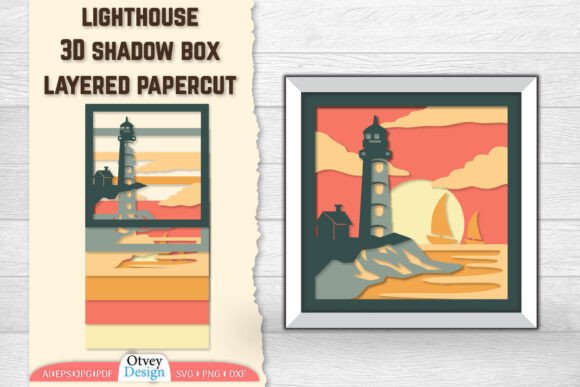
Lighthouse 3D Shadowbox Layered Papercut
There is a unique magic in watching a flat sheet of paper transform into a scene that breathes with depth and light. The Lighthouse 3D Shadowbox Layered Papercut design captures this essence perfectly, offering a structured yet artistic approach to creating three-dimensional art without the need for complex machinery or expensive materials. For creators, designers, and hobbyists alike, this digital template serves as more than just a file; it is a blueprint for crafting an emotional focal point that draws the eye and tells a story.
Whether you are a small business owner looking to create custom home decor, an educator seeking engaging classroom projects, or a freelancer expanding your portfolio, the versatility of layered papercutting provides a tangible way to connect with your audience. The lighthouse motif, often symbolizing guidance, safety, and hope, adds a layer of meaning that resonates deeply across various demographics. By utilizing high-quality digital assets, you can ensure that every cut is precise, every shadow falls correctly, and the final assembly stands out as a professional piece of art.
The Art of Depth: Understanding the Design
What makes the Lighthouse 3D Shadowbox Layered Papercut so compelling is its reliance on the interplay between light, shadow, and space. Unlike traditional two-dimensional illustrations, this design utilizes multiple layers of paper, each carefully spaced to create the illusion of distance. When backlit, the gaps between the layers cast intricate shadows that add texture and dimension, turning a simple silhouette into a dynamic landscape.
This technique is particularly effective for the lighthouse theme because it allows for the separation of distinct elements: the rugged cliffs, the rolling ocean waves, the sturdy tower, and the sweeping beam of light. Each layer contributes to the narrative, guiding the viewer's eye from the foreground to the background. For those new to the craft, understanding how these layers interact is the first step toward mastering the medium. It is not merely about cutting shapes; it is about curating a visual experience where negative space becomes as important as the paper itself.
Flexible Formats for Every Workflow
One of the greatest advantages of purchasing this digital asset is the comprehensive range of file formats included in the download. We understand that different creators work with different tools, and flexibility is key to a smooth production process. Your downloaded ZIP file includes a variety of formats designed to accommodate everything from laser cutting machines to manual crafting:
- AI File (Adobe Illustrator): Ideal for vector editing, allowing you to adjust colors, scale, or modify specific details while maintaining crisp edges.
- PDF File: Perfect for quick printing or sharing with collaborators who may not have access to specialized design software.
- EPS File: A universal vector format compatible with a wide array of graphic design programs, ensuring compatibility across platforms.
- JPG file & PNG File: High-resolution raster images suitable for mockups, social media previews, or instructional guides.
- SVG File: Excellent for web integration or use with modern cutting machines like Cricut and Silhouette.
- DXF File: The industry standard for CAD software and laser engravers, ensuring precision when using automated cutting equipment.
This extensive collection ensures that you are never limited by software constraints. Whether you are a tech-savvy entrepreneur running a laser-cutting service or a hands-on crafter using scissors and a cutting mat, you will find the perfect toolset within this package.
Creative Applications and Project Ideas
The potential applications for the Lighthouse 3D Shadowbox Layered Papercut extend far beyond a single framed picture. Here are several practical ways to adapt this design for different goals and audiences:
Custom Home Decor and Gifts
For interior designers and gift-makers, this design offers a sophisticated alternative to mass-produced wall art. Assemble the layers inside a deep wooden frame with LED strip lighting to create a glowing nightlight or a striking centerpiece. The lighthouse theme fits seamlessly into coastal, nautical, or rustic decor styles. You can customize the color palette—using warm creams, deep blues, or even metallic accents—to match specific client preferences or seasonal themes.
Educational Tools and Storytelling
Teachers and content creators can leverage this design to teach concepts related to geography, engineering, or storytelling. In a classroom setting, students can assemble their own shadow boxes, learning about perspective, layering, and the physics of light. For bloggers and educators creating digital content, the JPG and PNG files serve as excellent visual aids to illustrate articles about maritime history or creative hobbies.
Marketing and Branding Assets
Small business owners and marketers can utilize the vector files to create branded merchandise. Imagine a boutique stationery shop selling pre-cut kits for DIY enthusiasts, or a local café featuring a large-scale version of the lighthouse in their window display. The clean lines and recognizable imagery make it an effective logo element or promotional graphic that conveys stability and guidance.
Freelance Portfolio Pieces
Designers and freelancers can use this project to demonstrate technical proficiency in both digital design and physical fabrication. Including a photo of the finished shadow box in your portfolio showcases your ability to translate digital concepts into tangible products, a skill highly valued in the maker economy.
Tips for Consistent and Professional Results
To ensure your final product looks polished and professional, attention to detail during the preparation and assembly phases is crucial. Start by selecting high-quality cardstock or specialty paper with a consistent weight. Thinner paper may bend under the weight of multiple layers, while overly thick stock might be difficult to cut cleanly, especially if working manually.
When using the AI, EPS, or DXF files for laser cutting, always run a test cut on a scrap piece of material to calibrate power and speed settings. This prevents burning edges or incomplete cuts. If you are assembling the layers manually, use a ruler and bone folder to score fold lines if necessary, and apply adhesive sparingly to avoid warping the paper. Consistency in spacing between layers is vital; use spacers or a jig to maintain uniform gaps, which ensures the shadows fall evenly when lit.
Finally, consider the lighting source. While natural daylight reveals the texture of the paper, an internal LED backlight enhances the 3D effect by casting dramatic shadows through the layers. Experiment with different color temperatures to evoke different moods—a cool white light for a crisp, modern look, or a warm amber glow for a cozy, nostalgic feel.
Bring Your Vision to Life Today
The Lighthouse 3D Shadowbox Layered Papercut is more than a digital download; it is an invitation to explore the intersection of design, craftsmanship, and storytelling. With its versatile file formats and timeless aesthetic, it empowers you to create something truly unique that resonates with your personal style or your brand's identity. Don't let hesitation hold you back from starting your next creative project.
We encourage you to take the leap and bring this stunning design to life. Whether you are producing a one-of-a-kind gift, launching a new product line, or simply enjoying a weekend crafting session, the possibilities are endless. If you have any questions about the file formats, assembly techniques, or customization options, please do not hesitate to ask. Our team is here to support your creative journey and ensure you get the most out of your purchase. Thank you for choosing our designs, and we look forward to seeing what you create.