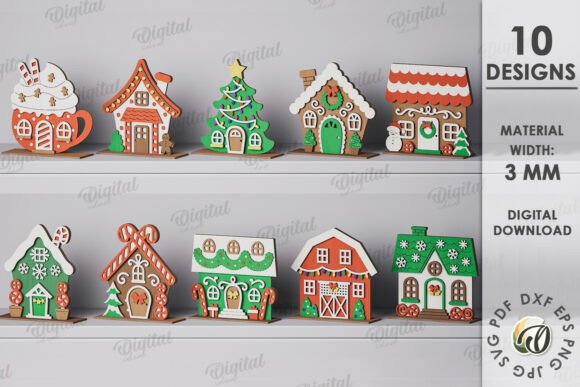
3D Christmas Houses Laser Cut Bundle: A Practical Guide to Digital Crafting
The holiday season brings a unique desire for personalized decor, and the 3D Christmas Houses Laser Cut Bundle offers a compelling solution for those who want to create something truly original. Whether you are decorating a cozy home office or setting up a festive display for a small business, these digital designs provide the foundation for stunning, three-dimensional structures. However, before you rush to download, it is crucial to understand exactly what you are buying and how to use it effectively. Many creators make the mistake of assuming they will receive a physical kit, only to be disappointed when no box arrives at their doorstep. This guide aims to clarify the nature of this product, highlight common pitfalls, and offer practical advice to ensure your crafting project is a success.
Understanding the Nature of Digital Craft Files
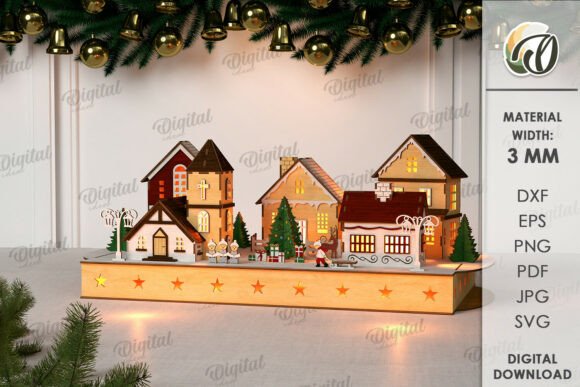
The most significant misunderstanding surrounding the 3D Christmas houses laser cut bundle concerns its delivery method. This is strictly a digital product. When you purchase this item, you are not buying pre-cut wood, acrylic, or cardboard. Instead, you are acquiring a zip folder containing ten distinct house designs in various file formats, including SVG, DXF, EPS, PDF, JPEG, and PNG. The photographs used to showcase these items are intended solely for inspiration; they represent the potential outcome of your work, not the physical goods you will receive.
This distinction is vital for managing expectations. If you are a beginner looking for a "plug-and-play" experience without any technical setup, this bundle might require more preparation than anticipated. You will need access to a laser cutter or a compatible cutting machine, as well as the necessary software to open and manipulate the vector files. Without these tools, the digital files remain just that—digital. Understanding this upfront prevents frustration and ensures you have the right equipment ready before making a purchase.
Common Mistakes in Material Selection
Once you have downloaded the files, the next critical decision involves material selection. A frequent error among hobbyists and professionals alike is ignoring the specific thickness requirements of the design. For this particular 3D Christmas Houses Laser Cut Bundle, the material width required is 3mm. Using material that is too thick can result in poor cuts, where the laser fails to penetrate completely or burns the edges excessively. Conversely, using material that is too thin may lead to structural instability, causing the assembled houses to collapse or look flimsy.
To avoid this, always verify your material stock before starting. Standard basswood, MDF, or acrylic sheets often come in varying thicknesses. If you do not have 3mm material on hand, purchasing a different thickness and attempting to force the design to fit will likely ruin both the material and the final aesthetic. A better approach is to source materials specifically labeled as 3mm or adjust the kerf settings in your software if your machine allows for minor compensations, though sticking to the recommended 3mm is the safest route for optimal results.
Navigating File Formats and Software Compatibility
Another area where creators often stumble is file management. The bundle includes multiple formats like SVG, DXF, and EPS, which is excellent for versatility but can be confusing if you are unsure which one to use. A common mistake is trying to open a vector file (like SVG or DXF) in an image editor meant for raster graphics, such as Photoshop, without understanding how to trace or convert them properly. This can lead to distorted lines and jagged edges that compromise the precision needed for laser cutting.
For the best results, match the file format to your workflow. If you are using a standard laser cutter with proprietary software, the DXF or SVG formats are typically the most reliable. These vector-based files ensure that lines remain crisp and scalable, regardless of the size you choose to cut. Before importing, take a moment to inspect the file layers. Ensure that the score lines and cut lines are clearly distinguished. Misinterpreting these lines can cause your machine to cut through parts that should only be scored, rendering the assembly impossible. Taking five minutes to review the file structure in your vector software can save hours of wasted material later.
Planning Your Project Scope and Assembly
While the possibilities of creation are endless, attempting to produce all ten designs in a single session without a plan is a recipe for disorganization. The 3D Christmas houses laser cut bundle contains a variety of styles, each with its own complexity. Beginners often underestimate the time required for assembly. Unlike flat prints, 3D structures require careful folding, gluing, or interlocking of pieces. Rushing this process can lead to misaligned walls and uneven roofs, detracting from the professional look you aim to achieve.
A more effective strategy is to start with one or two simpler designs to familiarize yourself with the assembly process. Test the glue application and drying times on scrap material first. Once you are comfortable with the technique, you can scale up to the more intricate models. Additionally, consider the end goal. Are these houses for a large window display, or are they individual ornaments? Adjusting the scale of the design in your software before cutting can significantly impact the amount of material needed and the difficulty of assembly. Planning ahead ensures that your final presentation is polished and cohesive.
Evaluating Value and Long-Term Utility
When evaluating the 3D Christmas Houses Laser Cut Bundle, it is important to look beyond the immediate holiday season. These designs are not just for December; they can serve as year-round decor for offices, educational props for classrooms, or even prototypes for marketing campaigns. Entrepreneurs and small business owners often overlook the commercial potential of such bundles. By creating custom signage or unique gift boxes using these patterns, you can add value to your brand without the high cost of manufacturing custom molds.
However, to maximize this value, you must treat the digital files as a long-term asset. Save your original downloads in a secure location and organize your working copies by project. Do not delete the backup files after one use. The ability to revisit and modify these designs for future seasons or different applications makes the initial investment worthwhile. Remember, the quality of your output depends heavily on your attention to detail during the planning and execution phases.
Final Thoughts on Getting Started
Crafting with the 3D Christmas Houses Laser Cut Bundle is a rewarding endeavor that blends creativity with technical skill. By recognizing that this is a digital product requiring specific hardware and 3mm material, you set yourself up for success. Avoid the trap of rushing into production without testing your settings or reviewing your file formats. With careful planning and the right approach, you can transform these digital blueprints into beautiful, tangible decorations that bring joy and originality to your space. If you have questions about the files or need clarification on usage, reaching out for support is always encouraged. Happy shopping and happy creating.